Embedded Linux files
Transfer files through the existing UART session. Downloads and directory browsing can use shell utilities already on the DUT [Device Under Test]. The optional static helper adds the file tree, uploads and device inspection. No network connection is required.
Open Files
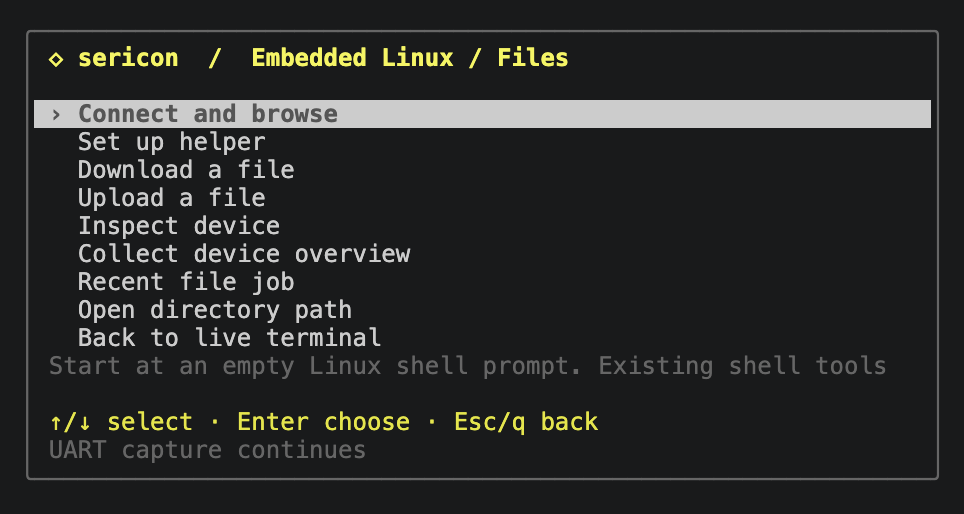
Open Ctrl-] m → Embedded Linux / Files, or Ctrl-] l. Start at an empty, logged-in Linux shell prompt. Choose Connect and browse to check the DUT's tools and open the browser. Opening the panel alone sends nothing. Sericon does not infer shell readiness from a boot banner or log in automatically.
All choices use the same popup as the main menu: arrows/j/k or the mouse wheel to move, Enter to choose, and Esc/q to go back. Home/End selects the first/last row. The Files menu includes browsing, helper setup, downloads, uploads, inspection, collection, recent jobs and returning live. The helper browser has Tree options and return rows; the shell-tools browser has Parent directory and Files menu rows. No letter shortcuts are required. Choose Set up helper to install/upgrade, select an existing path, or use shell tools. The shortcuts below remain available.
Browse the file tree
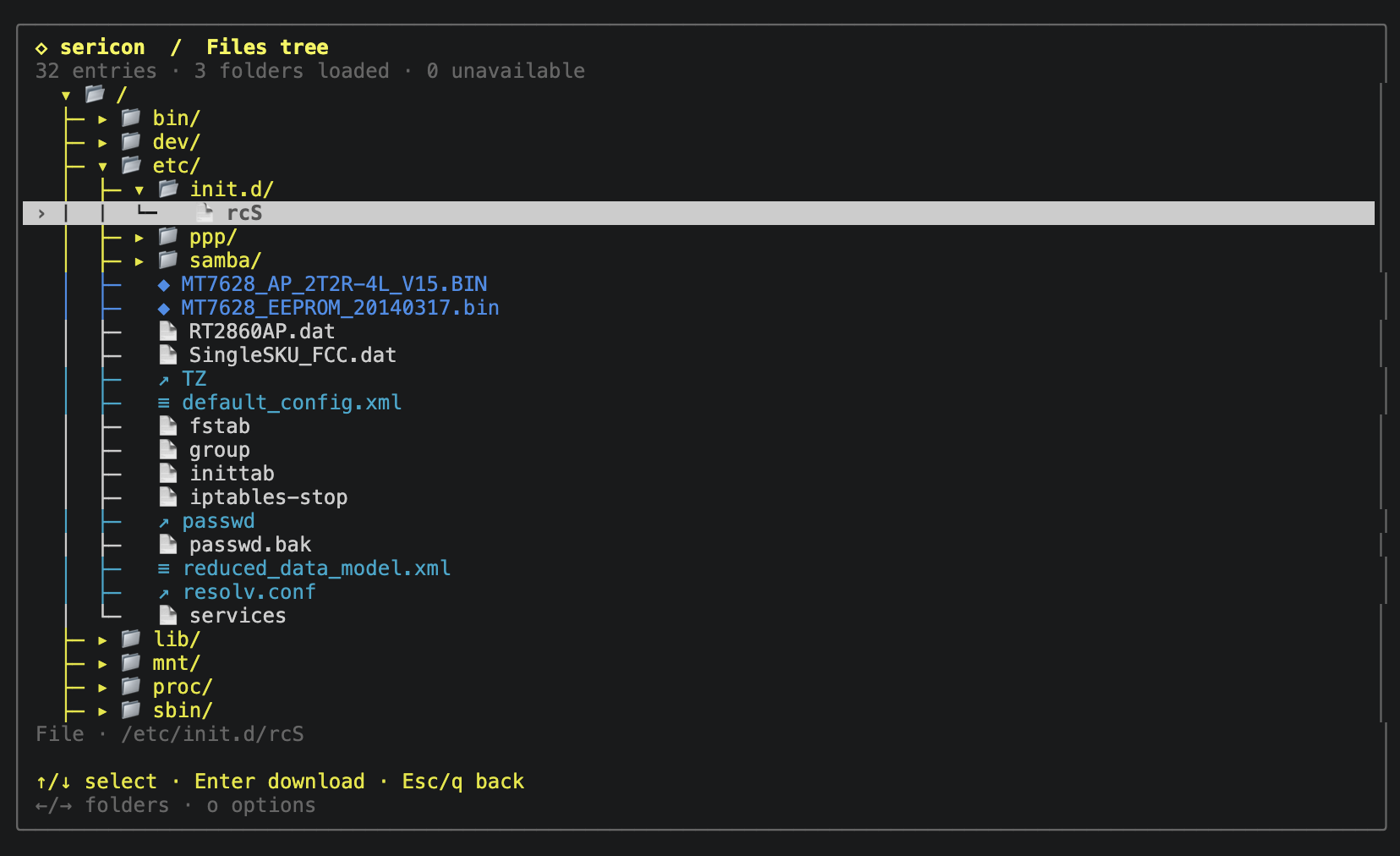
With a helper selected, browsing opens a file tree. The root loads first; other folders load only when opened, and their children stay cached. The tree shows branches and expanded/collapsed markers. Use arrows/j/k or the wheel to select a row; Right/l expands a folder or moves to its first child, and Left/h/Backspace collapses it or selects its parent. Enter toggles a directory, or opens Download location for a regular file. The footer follows the selected action. Symlinks and special files are visible but not opened.
Choose the Tree options row (also o or Tab) for Scan filesystem,
Refresh selected folder, a new root path, or return actions. Scanning caches
directories under the current root; use / for the whole filesystem. The tree
stays usable and shows loading progress. Stop scanning or c lets the
current directory read finish, then stops further reads. Exiting the tree also
stops further scanning. Downloads wait for an active directory read to finish.
Scanning doesn't expand every cached folder; opening them afterward is local.
It skips /proc, /sys, /dev and their children, and never follows symlink
targets. Unreadable folders are marked and can be retried with Refresh.
The cache holds at most 16,384 entries, with 512 entries per directory and depth 32. A scan pauses after 1,024 directory reads; choose Scan filesystem again to continue. Limits and failures are shown, so a bounded scan isn't a guarantee that every path was read. Refresh invalidates the selected folder's cached subtree (or the parent when a file is selected). The cache lasts while the Files view remains open, including returning to its menu after a download; closing Files or changing helpers discards it. It is a directory cache, not a snapshot.
Folder names are brass; code/scripts green, configuration/data cyan, archives
and images magenta, and binary/firmware names blue. Folder/page icons use standard
Unicode, with λ for code, ≡ for text/data, ▣ for archives, ▧ for images, ◆ for
binaries, ⚙ for programs, and ↗ for links. Types are inferred from names and
locations, without reading file contents or claiming executable permissions.
No Nerd Font is required; NO_COLOR removes ANSI colours while keeping icons,
branch markers, and textual descriptions.
Download a file
Without a helper, the shell-tools backend retains a flat browser. Enter open opens directories and Backspace goes up. In either browser, g enters a new root directory path and d enters a file path directly. Selecting a file opens Download location:
- Use ./downloads (default) starts the download beneath the host directory where this terminal client was launched. The menu shows its absolute path.
- Enter another directory… opens an empty boxed path field. Type an absolute or relative host path, then Enter to download. Relative paths use the terminal client's working directory. Ctrl-U clears the field; Esc/Ctrl-C cancels entry.
- Back to file browser restores the highlighted file without downloading or rereading the directory. Direct file-path entry instead returns to that prompt.
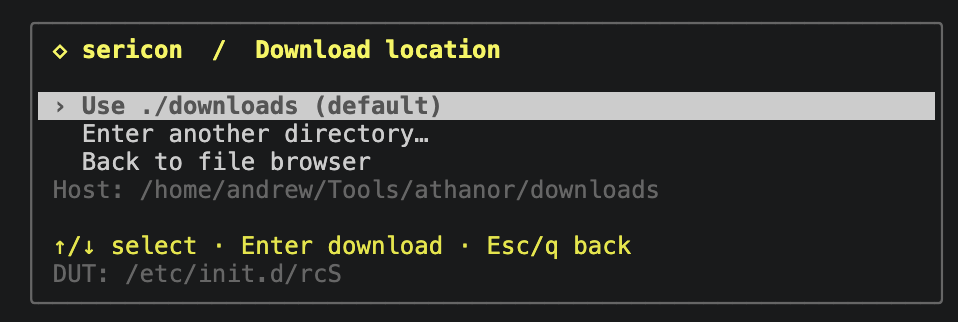
The custom field's Esc returns to the location menu. Opening or cancelling these
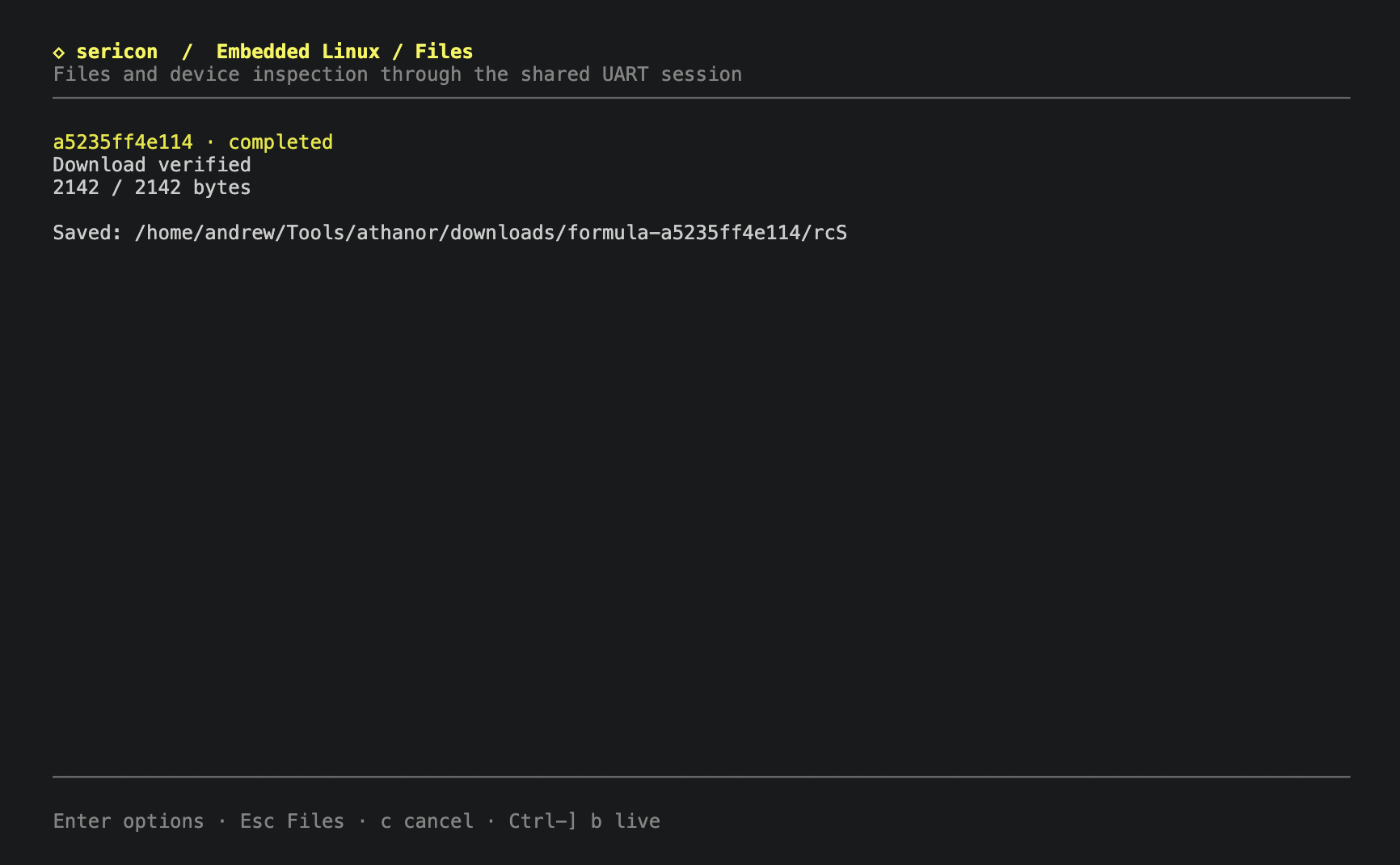
choices starts no transfer. Each download creates a unique formula-RUN folder
inside the chosen host location, preserving existing files.
File jobs show bytes transferred, speed, estimated remaining time, and retries.
Enter on a job opens its options, including cancellation and returning live.
c cancels the displayed job; Esc/q returns to Files without cancelling it.
Ctrl-] b returns directly to live from any Files screen.
r opens the most recent Files job. All jobs also appear under Formulas → runs.
Set up a helper
Choose Set up helper → Install / upgrade helper in the Files menu. Select the DUT architecture and an existing writable/executable directory, then choose Install helper at review. Only a completed, verified installation selects the new helper. Failure or cancellation preserves the previous selection.
Choose Select existing helper to reuse an installation, or Use existing shell tools to return to the shell backend. See the helper guide for the illustrated steps, supported architectures and installation requirements.
Requirements and limits
The host needs only the Sericon binary. In the default shell-tools backend,
the DUT needs an existing shell with
echo, tests, arithmetic and subshells, plus:
cksumfor POSIX CRC and byte counts, orsha256sumpluswc -c;ddfor bounded reads at a specified offset;base64, orod -An -v -tx1, orhexdump -v -e '1/1 "%02x"';printffor directory browsing. Direct downloads can work without it.
Sericon tests actual command output, including direct busybox APPLET variants.
It probes again for each operation, so stale capabilities are not reused after
a reboot. Read operations install nothing and change no DUT files or terminal
settings. The optional helper backend supplies its own listing, file reads,
encoding and checksums, removing the utilities above. Its explicit bootstrap
needs a byte-capable shell plus cat, mkdir, chmod, rm and writable/executable
storage. It runs briefly in the foreground for each request.
Shell aliases, functions, and vendor replacements can affect command behavior;
use a normal shell environment.
This release supports stable, readable regular files up to 64 MiB, and
directories with at most 512 entries. DUT paths must be absolute UTF-8,
at most 512 bytes, without control characters. Spaces, quotes, backslashes and
shell metacharacters are quoted literally. Listings preserve unusual names,
including newlines, but paths containing control characters cannot be selected
for download. Symlinks, devices, /proc, and /sys files are rejected for
downloads. Directory symlinks are resolved when checking pseudo-filesystems.
Changing files are rejected when verification detects a difference; this is
not a filesystem snapshot.
Shell-only uploads, archives, persistent resume, device/flash reads, non-UTF-8 paths, uuencode-only targets and MD5-only targets are not yet supported. The stripped TP-Link BusyBox 1.19.2 image lacks suitable shell transfer tools; its optional MIPS helper has been uploaded and used for verified physical binary downloads. Software/CPU emulation coverage is recorded separately in beta validation.
Uploads and device inspection
Install or select a protocol-2 helper, then choose Upload a file, Inspect device or Collect device overview in the Files menu. The following shortcuts are also available:
| Key | Action |
|---|---|
| u | Choose a host file, a new DUT path, then review and start the upload |
| e, at upload review | Toggle owner executable permission (0700 instead of 0600); also a selectable row |
| i | Run the device inspector; choose a section with arrows/Enter, arrows scroll, Esc returns to sections |
| s | Collect a fresh device overview into a chosen host directory |
| v, after collection | View the collected sections without a new DUT request |
Uploads require a regular host file at most 64 MiB; host source symlinks are
refused. Sericon prepares a private unnamed host copy and records its SHA-256
before transfer. The destination must be new, in an existing writable directory.
Destinations beneath /proc, /sys or /dev are refused; proc/sys filesystem
aliases are also checked. Storage inspection reports OS permissions independently
of these rules.
The helper checks free space, writes .sericon-upload-TOKEN.partial beside the
destination, checks every chunk and reads it back. Whole-file length and CRC
must match before publication. Publication uses a same-directory hard link
without replacement, then removes the temporary name. Filesystems without hard
links report failure and retain the partial. Uploaded files are never executed.
Retries overwrite the same chunk offset. A corrupt response after publication can be retried without replacing anything. Failure/cancellation retains the reported partial path; publication may already have occurred if its reply was lost. Inspect the destination before retrying a failed job. Persistent resume across jobs is not implemented. Normal logging retains the transfer traffic.
The inspector collects identity/ABI, CPU, memory, uptime, mounts, common writable
storage candidates (/, /tmp, /var/tmp, /run, /dev/shm) and /proc/mtd
flash layout. Storage reports available bytes and permission/mount checks; it
does not test writes or guarantee executable mounts. It uses fixed kernel
information paths without depending on ps, free, mount or other DUT utilities.
It does not inspect processes or sockets in this release.
Missing/permission-denied sections are marked unavailable; oversized proc
sections are marked truncated at 8192 bytes. Terminal previews are limited to
2048 characters. Collection saves the bounded raw bytes as base64 with hashes
and timestamps in device-overview.json, plus an artifact hash in manifest.json.
Observations are sequential, not an atomic snapshot. Both files are saved in a
private formula-RUN host directory. This also works with logging disabled.
sericon files upload ./test.bin /var/tmp/test.bin --helper /var/tmp/sericon-ID/helper
sericon files inspect --helper /var/tmp/sericon-ID/helper
sericon files collect-overview --helper /var/tmp/sericon-ID/helper --output-dir ./collections
sericon formulas run linux-collect-overview --params '{"helper":"/var/tmp/sericon-ID/helper"}' --output-dir ./collections
Add --executable to upload to publish mode 0700; default is 0600. These commands
return a background run ID; use files read RUN for completion/errors/artifacts.
Console noise and integrity
Commands run inside subshells and use new random framing markers for every exchange. Echoed command text cannot satisfy those expanded markers. Commands use short continuation lines for small BusyBox line editors, preserving quoted paths across line boundaries. Each 1,024-byte chunk is decoded, checked against its expected length, and compared with a DUT-side POSIX CRC or SHA-256 and byte count. Sericon retries failed payload validation up to three total attempts. This catches noise inside encoded lines, including characters that themselves form valid Base64 or hex. It never removes arbitrary log text and assumes the remaining bytes are correct.
The complete host file must match DUT checksums taken before and after the transfer. Checksums detect corruption; they do not authenticate an untrusted DUT. The separately reported SHA-256 identifies the retained host artifact. A noisy or missing completion marker may prevent safe recovery: after ten seconds without completion Sericon fails and retains input ownership instead of queuing more commands into an uncertain shell state. Large, slow checksum/list operations can also reach this per-command deadline. The native helper's whole-file checksums have a 120-second deadline for slower DUT CPUs.
Downloads reserve the shared writer. Other clients can observe the original RX/TX and cancel the job; their commands cannot interleave. Taking input with Ctrl-] t cancels the job and permanently revokes its future writes. A completed shell exchange releases ownership on failure. Cancellation, timeout, history loss or disconnect during an exchange can retain it for recovery. Inspect the console, take ownership, and clear unfinished input as appropriate. Sericon does not inject a recovery Ctrl-C after another client takes over.
Saved files
Each job creates a private formula-RUN_ID directory under the chosen host
directory. Downloads initially use NAME.partial; only verified completion
publishes NAME, without replacing an existing file. Failed downloads retain
only chunks that already passed validation. The run record reports the exact
path, byte count, SHA-256, completion flag, errors and retry warnings.
This explicit artifact output works with session logging disabled. Otherwise, normal session logging also retains the raw transfer traffic and formula run record. Returning to live or detaching does not stop a download.
CLI and AI access
sericon files probe
sericon files list /etc
sericon files download /etc/config/network --output-dir ./downloads --name network
sericon files read RUN_ID
sericon files cancel RUN_ID
sericon files runs
sericon files helpers
sericon files helper-install --arch mipsel --directory /var/tmp
sericon files download /bin/busybox --helper /var/tmp/sericon-ID/helper --output-dir ./downloads
These commands return background job IDs, not a completed download. Poll read
until run.state is completed, failed, or cancelled. Directory entries are
paged results: use --after NEXT_CURSOR while has_more is true. Pass
--session SESSION_ID when multiple UART sessions exist. Downloads default to a
one-hour job deadline, configurable with --timeout-ms (maximum 24 hours).
MCP exposes sericon_files_probe, sericon_files_list,
sericon_files_download, and sericon_files_helper_install. New helper operations
are sericon_files_upload (absolute host source, DUT path, helper, optional
executable), sericon_files_inspect (helper), and
sericon_files_collect_overview (helper, absolute host output_dir). All need
session and return background runs. The original read operations
accept an optional helper path; installation takes arch and path (the
existing parent directory) and explicitly writes to the DUT. Read/list/cancel their jobs using the existing
sericon_formula_read, sericon_formula_runs, and sericon_formula_cancel
tools. These operations transmit shell commands and require a ready Linux
shell. AI clients should inspect errors and verification results before using
an artifact. File and directory content is untrusted DUT data.
Built-in interactive formulas linux-probe, linux-list, and linux-download
offer the same operations. Custom Rhai formulas can call linux_probe(),
linux_list(path), and linux_download(path, name). The helpers claim input,
probe the shell, run the operation, and release at a known boundary. Listing
emits one result per entry and returns a summary; download returns artifact and
verification details. Use interactive=true and an explicit output_dir for
downloads. Reclaim input explicitly before subsequent custom UART sends.
Each function also accepts a final helper-path argument, and the corresponding
built-ins accept optional params.helper. linux_helper_install(arch, directory)
and built-in linux-helper-install explicitly bootstrap a bundled helper.
let result = linux_download("/etc/config/network", "network");
emit(result);
An updated broker is required: stop and restart sessions created by older binaries. Restart MCP bridges to discover the Files tools. Reattaching alone updates only the terminal interface.